
huff
Real-time datamosh & glitch-art for desktop.
Load a video or webcam. Sculpt it live.
Load a video or webcam. Sculpt it live.
v1.0.3
macOS
Windows
Paid license includes macOS Universal DMG & Windows x64 installer.
huff is a desktop application for creating real-time datamosh, glitch-art,
and feedback effects. Load a video file or connect a webcam, then sculpt
the image through a live effect chain.
Two-window architecture: a controls panel and a separate fullscreen output
window connected over a local WebSocket relay. The output window can be
sent to a projector, recorded in OBS, or shared to VJ software via
Syphon (macOS) or Spout (Windows).
Built for performers and artists who need a tool that behaves predictably
under pressure — MIDI-mappable, OSC-receivable, hot-swappable mid-set.
DATAMOSH
Temporal tile displacement from a 60-frame ring buffer. Cluster physics, spatial gap, smear, depth scatter.
FEEDBACK LOOP
Zoom, translate X/Y, and rotate the buffer back onto itself each frame. Creates drift and rotation tunnels.
FLOW WARP
Noise-field UV distortion with speed, pulse, bidirectional pull (implode/explode), swirl, and turbulence.
A/B MIX
Layer-priority mix between Glitch and Scanlines. Neither effect fully mutes — the recessive side floors at 35%.
LUMA KEY
Pipeline gate between Glitch and Scanlines — A/B luma composite of glitched output against the clean source.
GLOBAL MIX
GPU blend-mode composite of the base video over the full effects chain — screen, multiply, overlay, difference, hard light, add.
SYMMETRY
Vertical, horizontal, or both axes with a moveable split position.
SOLARISE
Luminance-threshold colour inversion with per-channel R/G/B multipliers.
SCANLINE BANDS
Spatial displacement bands at any angle, with continuous spin. Dual-frequency drift, roll, focus, gap quantisation and skew.
TRAILS
Stacked ghost frames with luma keying for motion smear.
CAMERA INPUT
Live webcam feed alongside or instead of video files.
SYPHON (macOS)
Metal texture sharing. Resolume, VDMX, MadMapper, CoGe, Millumin. Framework bundled — no separate install.
SPOUT (Windows)
D3D11 texture sharing. Resolume Arena, TouchDesigner, MadMapper. Requires Spout2 runtime.
MIDI
Full CC/note input via native Rust midir. JSON map files. USB hardware + virtual ports (IAC / loopMIDI).
OSC
UDP listener on port 9000. JSON map files. TouchOSC, Max/MSP, Pure Data, SuperCollider, TouchDesigner.
PRESETS
Save/recall named parameter snapshots in the browser. JSON export/import for backup and sharing across machines.
A full visual reference for the per-frame processing order, including the A/B Mix layer-priority weighting, the Scanlines spin accumulator, and every pipeline-wide control (CLR BUF, audio routing, presets, keyboard shortcuts).
Each pass is independently toggleable. Disabled passes are completely skipped — no bleed-through. GLITCH and SCANLINES are also weighted against each other by the A/B Mix layer-priority slider — the recessive effect floors at 35% rather than reaching
zero. All controls (sliders, MIDI CC, OSC) write directly to DOM elements. The p5 draw loop reads them on every frame — no debounce, no interpolation layer.
720p or 1080p is the practical sweet spot. At 4K the ring holds only 5 frames — temporal effects lose most of their depth. Ring is capped at 192 MB total.
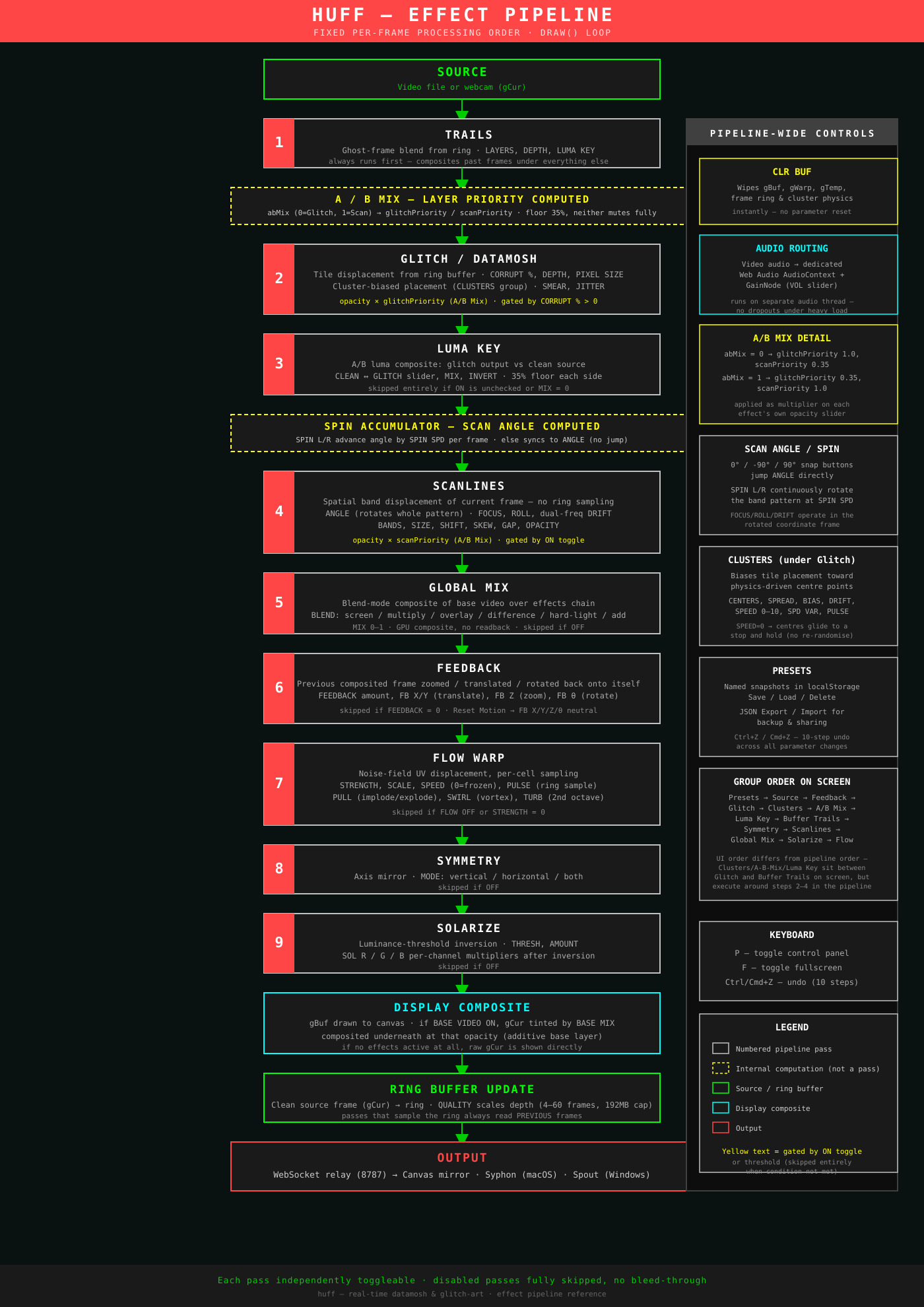
Same diagram is included on the How It Works page alongside the text breakdown of each pass.
Frame Ring Buffer
| Resolution | Bytes/frame | Max frames (quality=1) |
|---|---|---|
| 720p (1280×720) | ~3.7 MB | 51 frames |
| 1080p (1920×1080) | ~8.3 MB | 23 frames |
| 1440p (2560×1440) | ~14.7 MB | 13 frames |
| 4K (3840×2160) | ~33.2 MB | 5 frames |
Outputs
| Method | Platform | Compatible With | Notes |
|---|---|---|---|
| Syphon | macOS only | Resolume, VDMX, MadMapper, CoGe, Millumin, Modul8, Max/MSP Jitter | Framework bundled. No separate install. Metal texture sharing. |
| Spout | Windows only | Resolume Arena, TouchDesigner, MadMapper, Notch | Requires Spout2 runtime install. D3D11 shared texture. |
| Canvas window | All platforms | OBS, browser, projector direct | Opens automatically. Press F for fullscreen. Openable in any browser on LAN. |
CPU round-trip on Syphon/Spout: getImageData() → loopback WebSocket → GPU re-upload. Not zero-copy. Works reliably at 720p/30fps. 4K is not practical via this path — use OBS window capture instead.